産業用PC

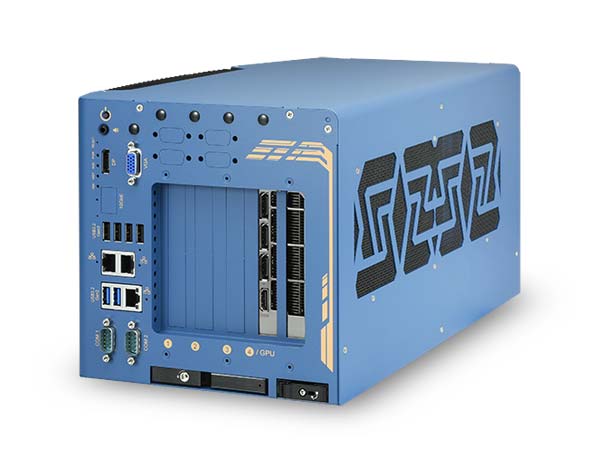
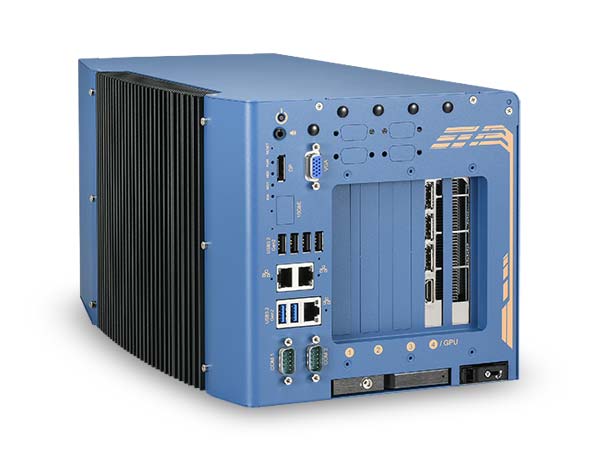
Nuvo-10108GC
シングル350W NVIDIA® RTX™ GPU、Intel®第14/13/12世代Core™プロセッサー、3つの追加PCIeスロットをサポートする産業エッジAIコンピューター
BOX型 Core i9-14900Core i9-13900Core i9-12900Core i7-14700Core i7-13700Core i7-12700Pentium Gold G7400Celeron G6900 3GPU DC電源 (or ACアダプタ) GPUコンピューティング ファクトリーオートメーション 監視用 車載 DC電源対応
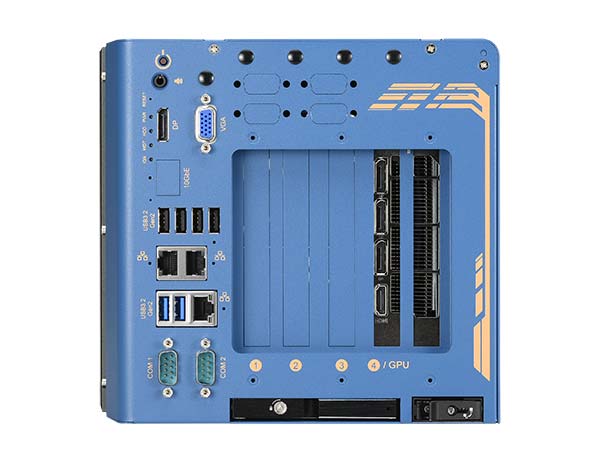
- Gen4 x16信号および専用のGPU固定ブラケットを備えた単一のNVIDIA® 350W GPUに対応
- Intel® 第14/ 第13/ 第12世代 Core™ 35W/ 65W LGA1700 CPU
- 最大128GBのECC/非ECC DDR5 4800、Intel R680Eチップセット(2x SODIMM)
- アドオンカード用のx8 PCIeスロット(Gen3 x4) x3
- USB 3.2 x6、2.5GbE x2、GbE x1、オプションの10GbE x1
- フロントアクセス可能なトレイ型ストレージのオプション x2:2.5" SATA x1、オプションNVMe x1
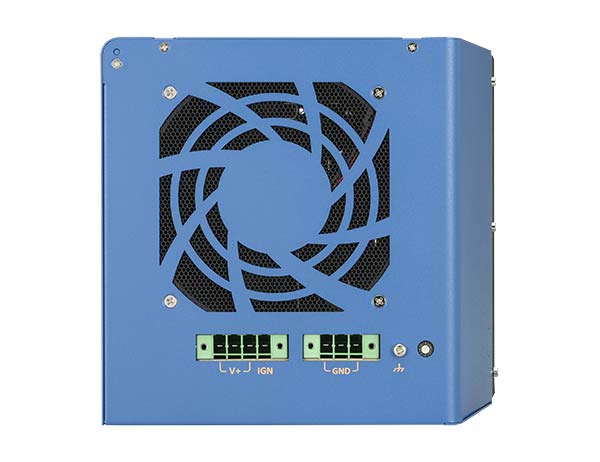
- 8V~48Vの広範囲DC入力、イグニッションパワーコントロール内蔵
- 堅牢な-25°C~60°C動作
製品仕様
| System Core | |||
|---|---|---|---|
| Processor | Supporting Intel® 14th-Gen Core™ CPU (LGA1700 socket, 65W/ 35W TDP) – Intel® Core™ i9-14900/ i9-14900T – Intel® Core™ i7-14700/ i7-14700T – Intel® Core™ i5-14500/ i5-14400/ i5-14500T – Intel® Core™ i3-14100/ i3-14100T Supporting Intel® 13th-Gen Core™ CPU (LGA1700 socket, 65W/ 35W TDP) – Intel® Core™ i9-13900E/ i9-13900TE – Intel® Core™ i7-13700E/ i7-13700TE – Intel® Core™ i5-13500E/ i5-13400E/ i5-13500TE – Intel® Core™ i3-13100E/ i3-13100TE Support Intel® 12th-Gen Core™ CPU (LGA1700 socket, 35W/ 65W TDP) – Intel® Core™ i9-12900E/ i9-12900TE – Intel® Core™ i7-12700E/ i7-12700TE – Intel® Core™ i5-12500E/ i5-12500TE – Intel® Core™ i3-12100E/ i3-12100TE – Intel® Pentium® G7400E/ G7400TE – Intel® Celeron® G6900E/ G6900TE |
||
| Chipset | Intel® R680E Platform Controller Hub | ||
| Graphics | Integrated Intel® UHD Graphics 770 (32EU) / 730 (24EU) | ||
| Memory | Up to 128GB ECC/ non-ECC DDR5 4800 SDRAM (up to 2x 64GB SODIMM modules)[1] |
||
| AMT | Supports Intel vPro/ AMT 16.0 | ||
| TPM | Supports dTPM 2.0 | ||
| I/O Interface | |||
| Ethernet | 2x 2.5G Ethernet by I226-IT and 1x Gigabit Ethernet by I219-LM | ||
| 10G Ethernet (optional) | 1x 10GBASE-T port by Marvell AQC113CS, supporting NBASE-T (5G/ 2.5G) and 1000BASE-T (Optional) | ||
| USB | 6x USB 3.2 Gen2x1 (10 Gbps) ports 1x USB 2.0 ports (internal for dongle use) |
||
| Serial Port | 2x software-programmable RS-232/ 422/ 485 ports (COM1/COM2) | ||
| Video Port(Integrated Graphics) | 1x VGA connector, supporting 1920 x 1200 resolution 1x DisplayPort connector, supporting 4096 x 2304 resolution |
||
| Audio | 1x 3.5 mm jack for mic-in and speaker-out | ||
| Storage Interface | |||
| SATA HDD | 1x front-accessible, hot-swappable HDD trays for 2.5″ HDD/ SSD installation | ||
| M.2 | 1x M.2 2280 M key socket (PCIe Gen4 x4) for NVMe SSD 1x front-accessible M.2 2280 M key tray (PCIe Gen4 x4) for NVMe SSD (Optional) |
||
| Expansion Bus | |||
| PCI Express | 1x PCIe x16 slot @Gen4, 16-lanes with 65 mm slot width. The standard GPU locking bracket is designed for NVIDIA® RTX™ Pro 4000, 4500, 5000, 6000 Max-Q, and other selected GPU cards. 3x PCIe x8 slots @Gen3, 4-lanes |
||
| mini-PCIe | 2x full-size mini PCI Express sockets with internal SIM sockets | ||
| M.2 | 1x M.2 2242/3052 B key socket with internal SIM sockets | ||
| Power Supply | |||
| DC Input | 3-pin + 4-pin pluggable terminal block for 8V to 48V DC input with ignition control[2] | ||
| Mechanical | |||
| Dimension | 214 mm (W) x 400 mm (D) x 196 mm (H) (without damping bracket) | ||
| Weight | 6.2 kg (excluding damping bracket) | ||
| Mounting | Wall-mount with damping brackets | ||
| Environmental | |||
| Operating Temperature | With 35W CPU and NVIDIA® 350W GPU -25°C to 60°C [3] with 65W CPU and NVIDIA® 350W GPU -25°C ~ 60°C[3][4](with optional fan kit) -25°C ~ 50°C[3][4](without optional fan kit) |
||
| Storage Temperature | -40°C ~ 85°C | ||
| Humidity | 10%~90% , non-condensing | ||
| Vibration | MIL-STD-810H, Method 514.8, Category 4 (with damping bracket) | ||
| Shock | MIL-STD-810H, Method 516.8, Procedure I (with damping bracket) | ||
| EMC | CE/FCC Class A, according to EN 55032 & EN 55035 | ||
[1] 2023年8月現在、DDR5 SODIMM 1枚あたりの最大容量は48GBです。
[2] システム負荷が100W未満の場合、必要なDC入力電圧範囲は8V~48Vです。システム負荷が100W~480W(GPU 1基)の場合、必要なDC入力電圧範囲は13.8V~48Vです。
[3] 氷点下の動作温度では、広温度範囲対応のHDDまたはソリッドステートドライブ(SSD)が必要です。
[4] 65WのCPUの場合、周囲温度が50°Cを超える環境での動作には、オプションのファンキットの使用を推奨します。
ご注文から納品までの流れ「発注方法がわからない」「納品までの流れがイメージできない」そんな不安を解消いたします!